
Development
This page covers the practical operations around BobDyn/BobSim: cloning, app launch, environment setup, make targets, local Python, cleanup, quality checks, and common failure paths.
Clone
For simulation workflows, clone BobSim with submodules. BobLib is included as a submodule.
git clone --recurse-submodules https://github.com/BobDyn/BobSim.git
cd BobSim
If the repository is already cloned without submodules:
make initThe BobLib submodule lives at:
_0_Utils/external/BobLib/Clone BobLib directly only when you want to work on the low-level Modelica model layer without the BobSim workflow wrapper.
App Launch
The app is the normal local entry point for setup, simulation launch, and result review. For users, prefer the released BobSim desktop executable. For development, run the same app from a source checkout.
From the BobSim root:
make docker-build
make app
Then open:
http://127.0.0.1:8765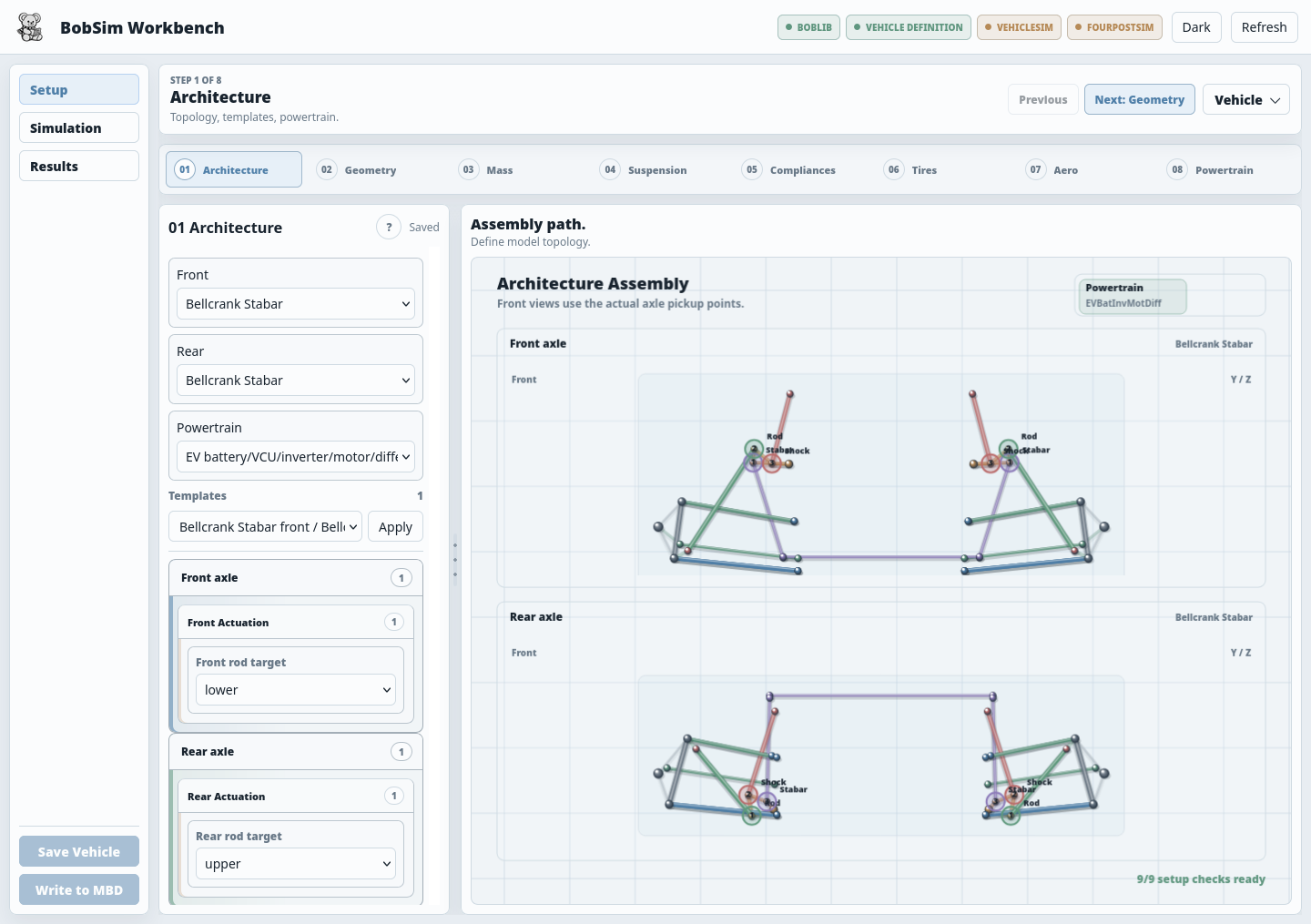
make app runs the app in the app compose service. That service has a network so it can publish its port, which the other services do not. The port is published on 127.0.0.1 only. APP_PORT sets the host port. The app in the container uses the image's OpenModelica, so no local install is needed.
make app RUN= runs the app in the Python environment that launched it. Install requirements.txt locally for that, and a local OpenModelica before building or running simulations from the app.
Released desktop builds store generated user data in the per-user runtime workspace:
| Platform | Default runtime root |
|---|---|
| Windows | %LOCALAPPDATA%\BobDyn\BobSim |
| macOS | ~/Library/Application Support/BobDyn/BobSim |
| Linux | ${XDG_DATA_HOME:-~/.local/share}/BobDyn/BobSim |
Set BOBSIM_HOME to override that location. BOBDYN_HOME remains supported for older local installs.
Desktop Release Builds
BobSim desktop artifacts are PyInstaller builds. They bundle the app frontend and Python backend, but intentionally do not bundle generated Modelica simulation executables, reports, app caches, or user workspaces.
Build the current platform's executable/app bundle:
make deployClean, build, and package a release artifact:
make deploy-release DEPLOY_VERSION=2026.06.28Release assets are platform-native. A Linux machine creates the Linux archive, a Windows machine creates the Windows zip, and macOS creates the macOS zip. The repository's Release Builds GitHub Actions workflow builds all three when a v* tag is pushed and uploads them to the GitHub Release with --clobber.
Deploy outputs are written under:
_0_Utils/deploy/dist/BobSim/
_0_Utils/deploy/dist/releases/
Docker Environment
BobSim ships with a Docker image based on:
openmodelica/openmodelica:v1.26.3-ompythonThe Dockerfile installs:
- OpenModelica runtime
- Modelica Standard Library
4.1.0 - VehicleInterfaces
2.0.2 - Python virtual environment under
/opt/venv - BobSim Python requirements
- plotting, reporting, PyVista, and video dependencies
Build the image:
make docker-buildRebuild from scratch:
make docker-rebuildOpen shells:
make shell
make shell-standard
make shell-envelope
make shell-opt
The compose services mount the repository into /workspace and set PYTHONPATH=/workspace.
Local Python
The container is the most repeatable path, but local development is possible if OpenModelica and Python dependencies are installed.
BobSim commonly uses the repository-local virtual environment:
source .venv/bin/activate
python -m pip install -r requirements.txt
To create it from scratch:
python -m venv .venv
source .venv/bin/activate
python -m pip install --upgrade pip
python -m pip install -r requirements.txt
Verify the basics:
python --version
omc --version
python -c "import yaml, scipy, pandas, matplotlib; print('ok')"
Make Target Reference
Setup and shell targets:
| Target | Action |
|---|---|
make init | Initialize/update git submodules |
make app | Launch the BobSim browser app in Docker (RUN= for the host) |
make deploy | Build the native desktop artifact for the current OS |
make deploy-package | Package the current deploy artifact for release |
make deploy-release | Clean, build, and package a release artifact |
make deploy-clean | Remove deploy outputs |
make docker-build | Build the Docker image |
make docker-rebuild | Rebuild the Docker image without cache |
make shell | Open the main BobSim shell |
make shell-standard | Open a StandardSim shell |
make shell-envelope | Open an EnvelopeSim shell |
make shell-opt | Open an OptSim shell |
StandardSim targets:
| Target | Action |
|---|---|
make standard-build | Build the integrated VehicleSim entry point |
make standard-build-four-post | Build the integrated FourPostSim entry point |
make standard-eval-ramp-steer | Run RampSteerEval |
make standard-eval-steady-state | Run SteadyStateEval |
make standard-eval-transient | Run TransientEval |
make standard-eval-four-post | Run FourPostEval |
make standard-eval-all | Run all standard evaluations |
Envelope and OptSim targets:
| Target | Action |
|---|---|
make envelope-ggv | Run GGV envelope generation |
make envelope-ymd | Run YMD envelope generation |
make envelope-all | Run all envelope outputs |
make opt-standard | Run StandardSens pre-screen sensitivities |
make opt-envelope | Run EnvelopeSens sensitivities |
make opt-refined | Run StandardSens refined response surfaces |
Quality and cleanup targets:
| Target | Action |
|---|---|
make lint | Run Ruff checks |
make typecheck | Run MyPy checks |
make test | Run pytest regression checks |
make ci | Run lint, typecheck, and tests |
make clean | Remove Python and tool caches |
make clean-standard | Remove StandardSim build/result artifacts |
make clean-envelope | Remove EnvelopeSim build/result artifacts |
make clean-opt | Remove OptSim build/result artifacts |
make clean-all | Run all cleanup targets |
Quality Checks
Run the release gate:
make ciThat expands to:
make lint
make typecheck
make test
GitHub Actions runs the same targets with the BobLib submodule checked out recursively. The pytest suite includes release-polish checks that assert the public make target language stays coherent.
Recommended Loops
For normal browser-based work:
make appThen use Setup, Simulation, and Archive.
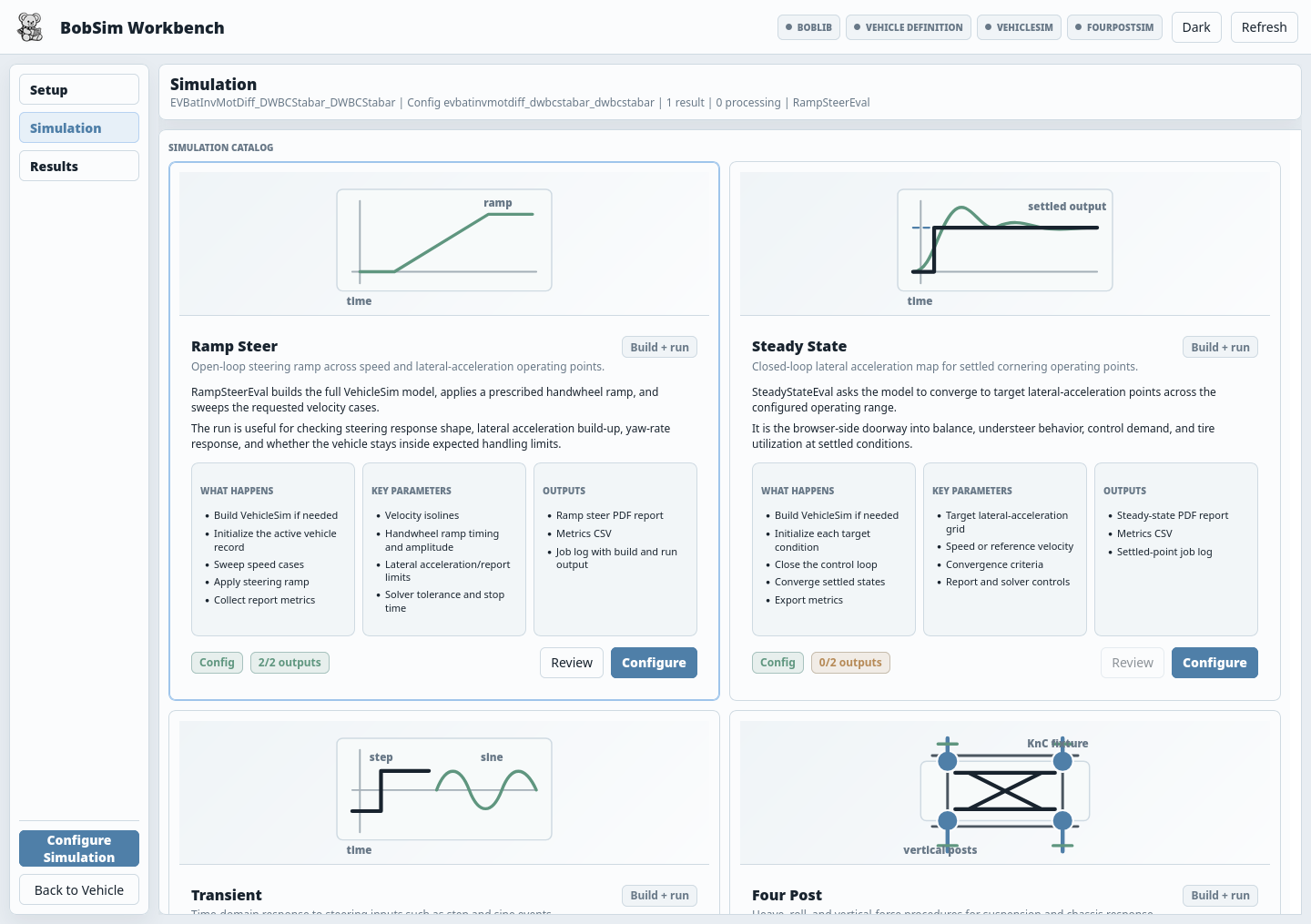
For standard maneuver work:
make standard-build
make standard-eval-ramp-steer
make standard-eval-steady-state
make standard-eval-transient
For suspension/K&C work:
make standard-build-four-post
make standard-eval-four-post
For envelope work:
make standard-eval-four-post
make envelope-all
For sensitivity work:
make clean-opt
make opt-standard
make opt-envelope
For a public-release check:
make standard-eval-all
make ci
Add make envelope-all when you intentionally want the optional envelope artifacts as part of the release package.
Troubleshooting
Executable not found
The workflow build directory does not contain the compiled OpenModelica executable. Run make standard-build or make standard-build-four-post.
Init XML not found
The OpenModelica build did not complete cleanly. Clean the matching build directory and rebuild.
BobLib not found
The submodule is missing or the path in a config is wrong. Run:
make initModelica package cannot load
Use the Docker path first. For local installs, confirm OpenModelica can find Modelica Standard Library 4.1.0 and VehicleInterfaces 2.0.2.
yaml import fails
Install BobSim requirements in the Python environment that is running the app or workflow:
python -m pip install -r requirements.txtomc is missing from the app run log
This happens only outside Docker. Use make app, or open the app's OpenModelica toolchain selector and choose the omc executable plus the OpenModelica library directory. If auto-detection fails, common library defaults are %APPDATA%\.openmodelica\libraries on Windows and ~/.openmodelica/libraries on macOS/Linux. For source-checkout CLI work, use the Docker-backed workflow targets when local OpenModelica is not available.
Simulation fails but no run directory remains
Set execution.cleanup: false in the workflow config and rerun. Then inspect the retained run directory under the build tree.
OptSim population mismatch
Sample count or variable dimensions changed while old variants remained on disk. Run:
make clean-optthen rerun the relevant make opt-* target.
The app page does not load
Open http://127.0.0.1:8765, not the 0.0.0.0 address the container prints. If the port is taken, use make app APP_PORT=8766.